View submissions
Access and track submissions across your organization from a single Submissions page, with built-in and saved views that remember exactly how you like to work.

Overview
Submissions are the core of your workflows in Droplet. My Assignments, My Submissions, and All Submissions used to be three separate nav items that opened the same table with a different scope built in. They are now one Submissions page, and those scopes live on as built-in views that sit in the toolbar alongside any views you save yourself. Which submissions you can see still depends on your role and permissions.
- All Submissions
- Every submission in your organization that you have permission to view or act on. Best for submission managers who process forms across the organization.
- My Submissions
- A built-in view scoped to the submissions you personally started. Best for tracking your own in-progress or completed work.
- My Assignments
- A built-in view scoped to the submissions waiting for you to take action - approve, reject, or complete your part of the workflow. Best for staying on top of your daily queue.
The Submissions page shows the page icon on the same line as the page title. That keeps the header compact and leaves more room for results, which is especially helpful on smaller screens.
NEW The home page now shows both form submissions and eSign submissions assigned to you.
The Submissions page
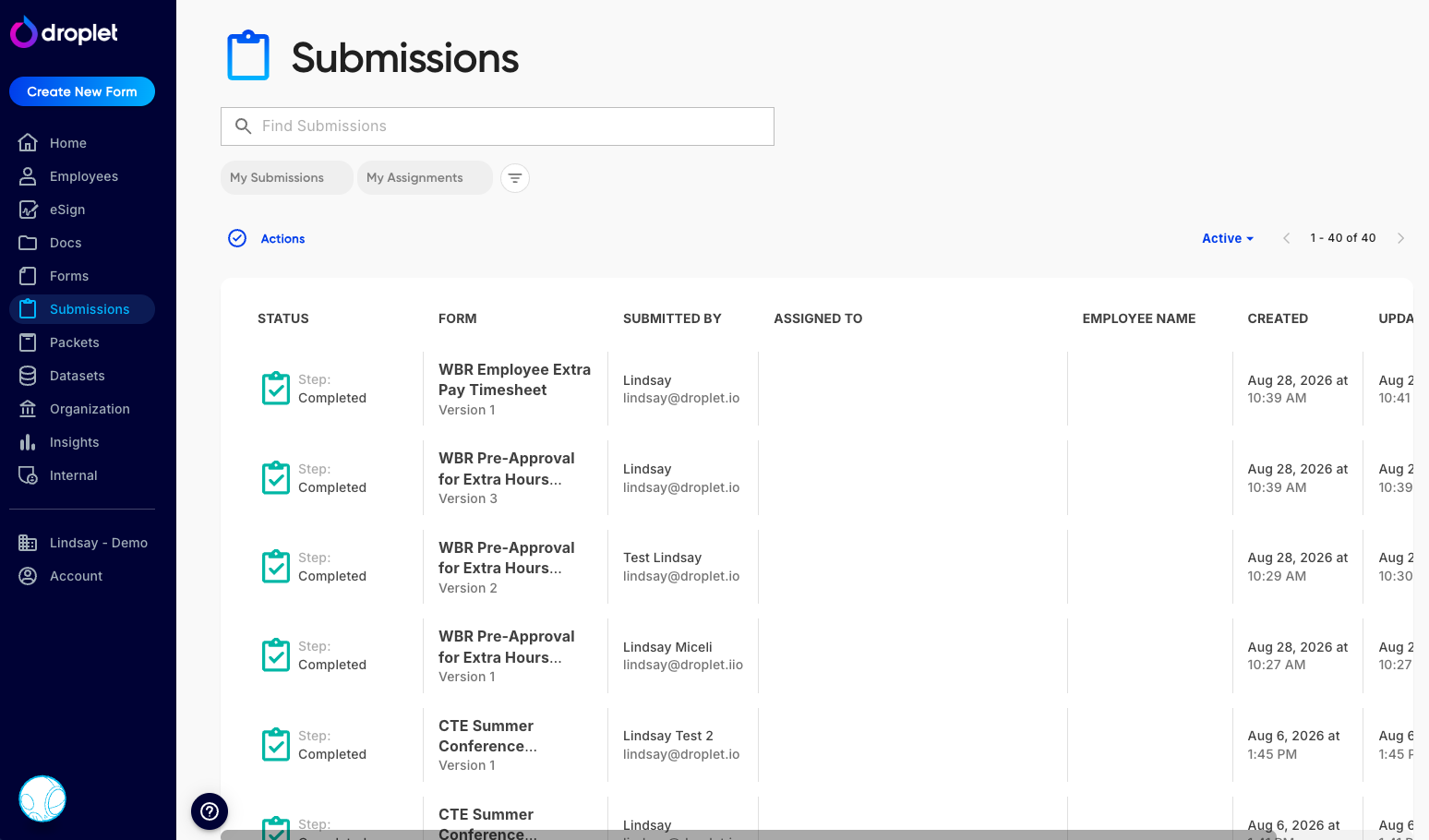
The Submissions page displays every submission you have permission to see, with the page icon beside the title, an always-visible search field on the page, and the view and filter controls in the toolbar above the results.
On the All Submissions view, the Submissions page gives you the broadest look at submissions in your organization. If your role grants access to other users' submissions, you'll see them all here. Otherwise, this view shows only the submissions you initiated or those assigned to you.
To Search and Filter:
Search is a plain, always-visible field on the page, so you can start typing without opening anything first. Filtering stays in the compact toolbar above the results: click Filters to narrow results by form, status, or other criteria, and click any column header to change the sort order. Click any submission to view its current status and details.
The Assigned To and Submitted By filters used to be available only on All Submissions. They now work in every view, so you can narrow any list by who owns the work or who started it.
Date range filters are labeled Beginning on and Ending on. Together they return the submissions that fall between the two dates you pick, which may be based on a date other than when the submission was created.
Saved Views:
Whatever you set up in the search field and the toolbar can be kept as a saved view. A view remembers your filters, search text, and sort order, so you no longer need a folder of browser bookmarks to get back to a list you use often. The page ships with built-in My Submissions and My Assignments views, and you can add your own on top of them.
To work with your views:
Set the search text, filters, and sort order you want, then click Save. In the Save view dialog, choose Create new view and give it a name.
Adjust the search field or toolbar again and click Save to write the new settings over the view you're on.
Rename a view at any time if its purpose changes.
Delete a view you created and no longer need, and restore it if you deleted it by mistake.
The built-in views are yours to change too: rename them, adjust their filters, and save over them like any other view. The one thing you can't do is delete them.
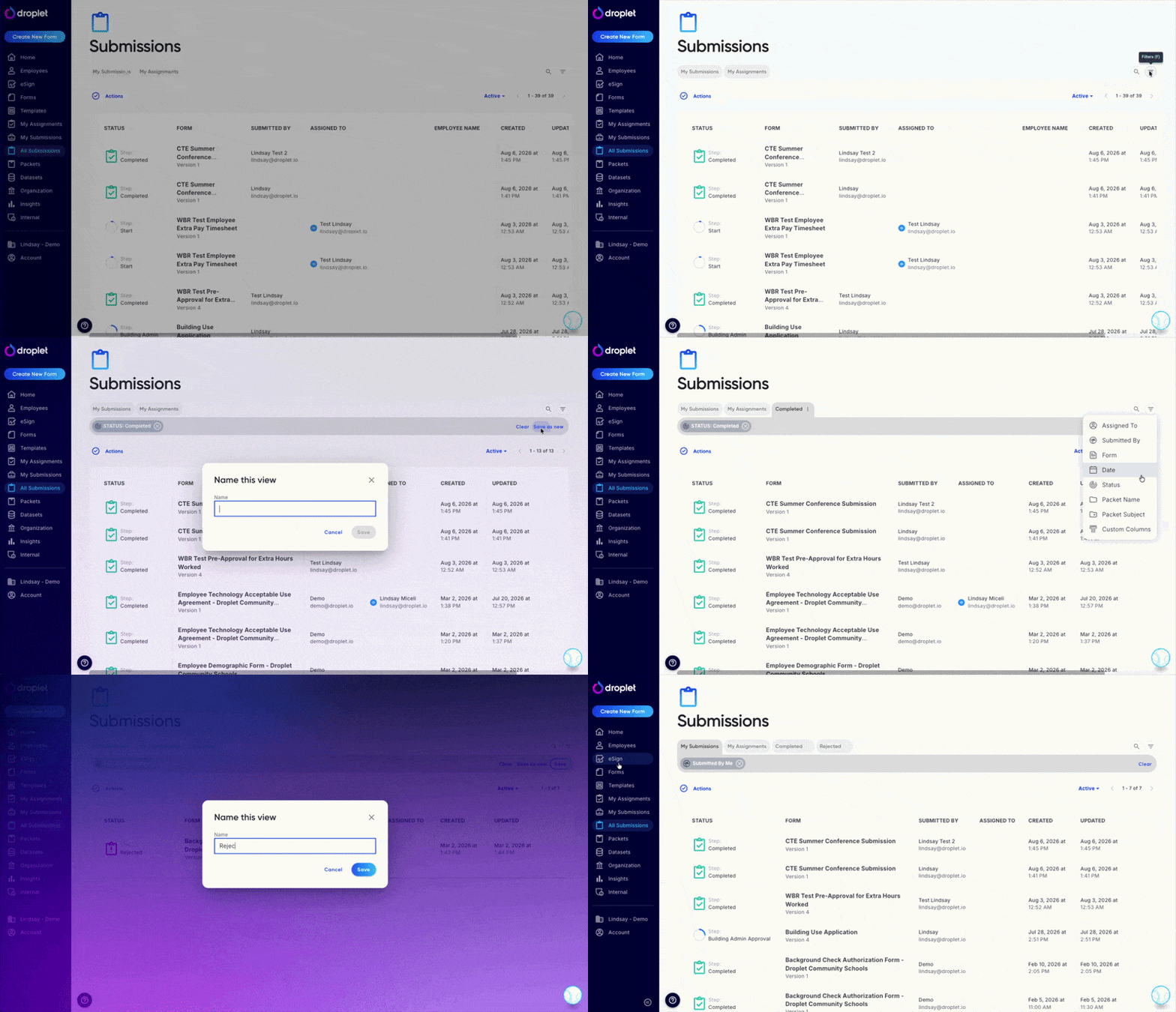
Views you create are private to you. The URL query is still the source of truth for what the table shows, so any bookmarks or deep links you already share keep working exactly as before. That includes the old /assignments and /submitted addresses, which still land on the same list with the same filters, even if you have to log in on the way there.
Status and progress now share a single cell in the Status column. While a submission is still in flight, the cell shows a live progress ring so you can see how far along it is without opening it. Once the submission lands, the ring is replaced by an icon for its final status. The Packets and eSign Submissions tables work the same way.
Some fields may appear blank if the submission is still in draft (Not Started) or is part of an ongoing workflow (In Progress). In both cases the combined status and progress cell shows a progress ring, so you can tell how much of the workflow is left before the remaining fields fill in.
A voided eSign submission inside a packet now reports its own Voided status instead of being labeled rejected, so voided items are easy to tell apart from genuinely rejected ones.
If you spend most of your time processing submissions, the All Submissions view is your go-to for managing and tracking progress across forms. Save a view for each queue you check daily and switch between them from the toolbar.
The My Submissions view
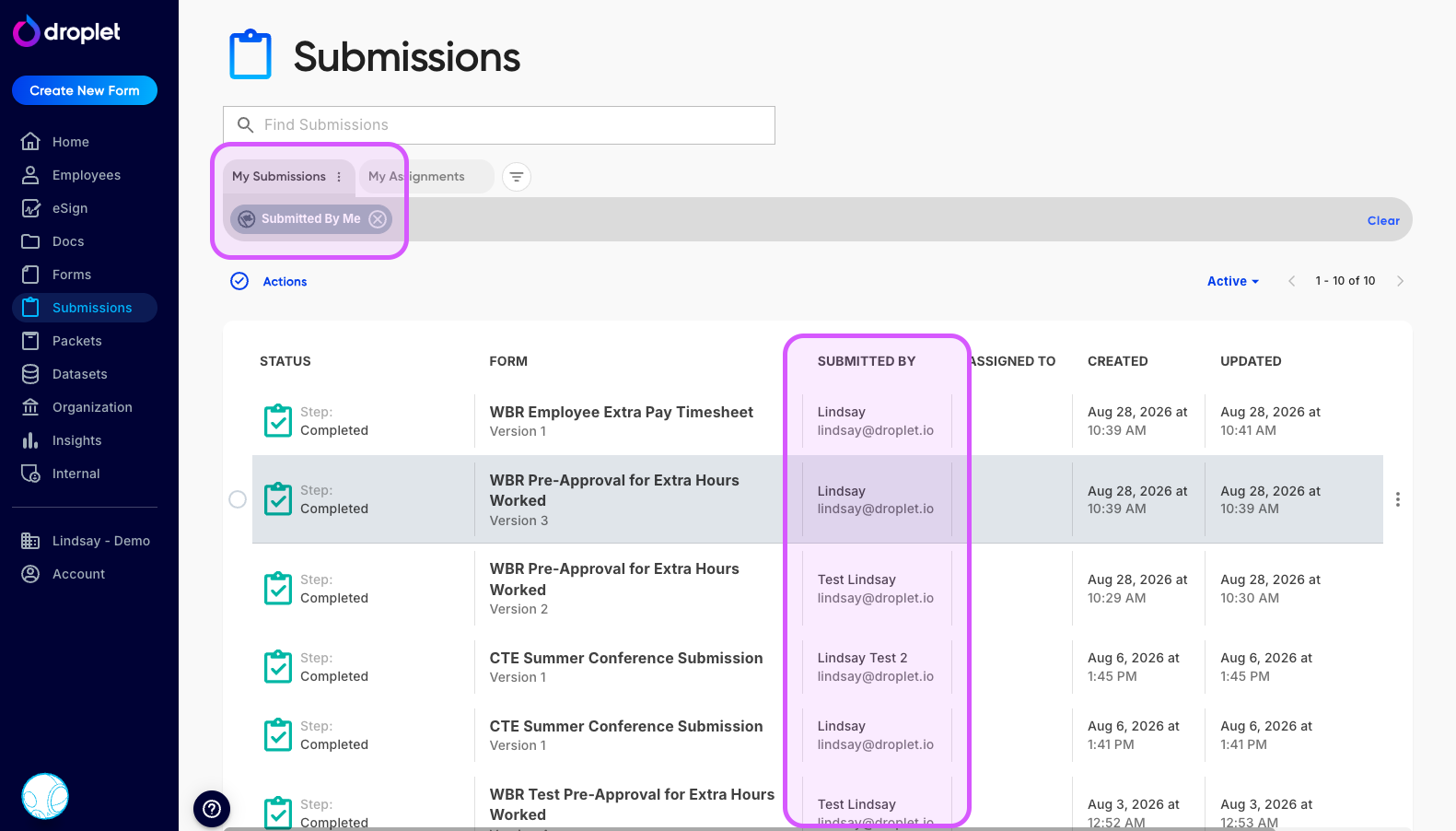
My Submissions view shows only the forms you have personally started.
The My Submissions view shows every submission you have personally initiated. Pick it from the view list in the toolbar, or open a /submitted bookmark you already have. Click any submission to see the parts you've completed and check its current status in the workflow.
This view is ideal for tracking the progress of your own submissions and making sure everything is on track. As everywhere else on the page, each row's status cell shows a progress ring while the submission is still moving through its workflow and a status icon once it finishes.
The My Assignments view

My Assignments view lists submissions that need your attention, with the page icon on the same line as the title.
The My Assignments view shows every submission that requires action from you - whether that's approving, rejecting, or completing your part of a form. Pick it from the view list in the toolbar, or open an /assignments bookmark you already have. It's also what your Home page is built on.
Once you take action on a submission by advancing or rejecting it, it disappears from this view. This keeps your list focused on what's still pending.
Frequently asked questions
I can't find a submission. What should I do?
Check that you're on a view broad enough to include it, such as All Submissions, then try logging out and back into Droplet. If the submission still doesn't appear, your account may not have the required permissions. Contact your organization's Droplet administrator for help.
Why are some fields blank on a submission?
Fields may be blank if the submission is still in draft (Not Started) or if it's part of an ongoing workflow where later steps haven't been completed yet. The progress ring in the status cell tells you how much of the workflow is still outstanding.
What happened to the My Assignments and My Submissions pages?
They're now built-in views on the single Submissions page, listed in the toolbar next to any views you've saved. Your old /assignments and /submitted bookmarks still open the same list with the same filters, even if you have to log in first.
Where did the Submissions search box go?
It's on the page. Search is a plain, always-visible field above the results, so you no longer open it from the toolbar. Filters and your views still live in the toolbar.
Can I change the built-in views?
Yes. Rename My Submissions or My Assignments, change their filters, and click Save to keep the changes on the same view. You can't delete them. If you'd rather keep the original and branch off it, choose Create new view in the Save view dialog and name the copy.
Can other people see the views I save?
No. Views you create are private to you, and so are any changes you make to the built-in My Submissions and My Assignments views. Because the URL query still drives the table, you can share a link to a filtered list even if the view itself is private.
What's the difference between the All Submissions and My Assignments views?
All Submissions shows every submission you have permission to see, regardless of status. My Assignments shows only the submissions currently waiting for you to take action.