Use permission conditions
Restrict what users can access based on specific criteria like ownership, assignment, or data values.
What are permission conditions?
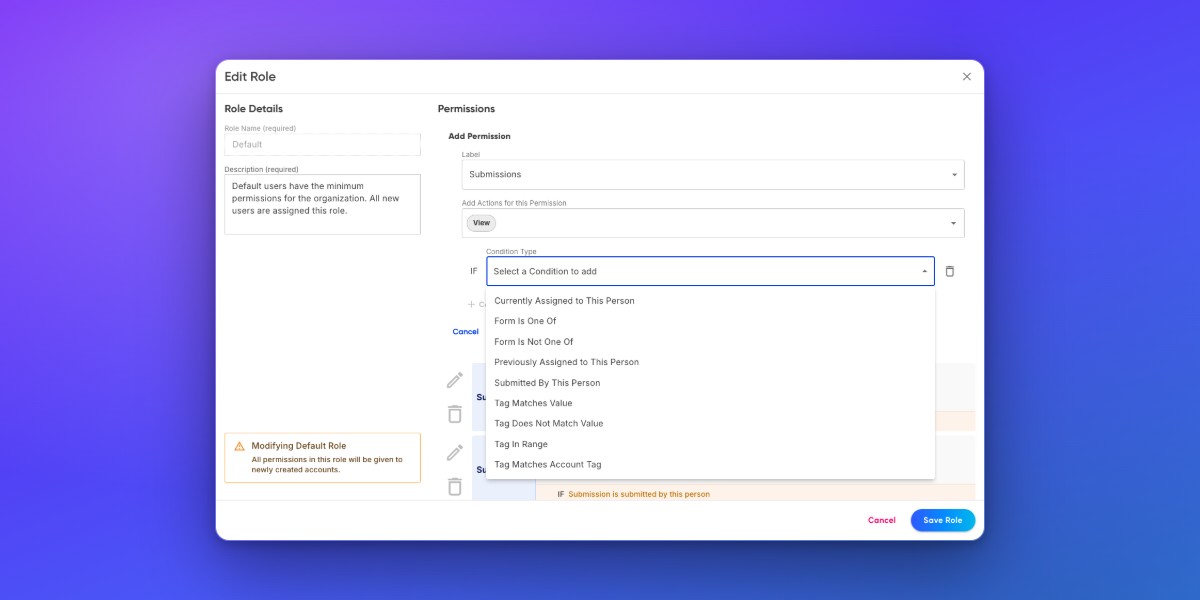
Permission conditions add granular rules on top of standard role permissions. While a role permission controls whether a user can view submissions, a permission condition controls which submissions they can view.
For example, you might give a Manager role the ability to view all submissions, but use a permission condition to restrict a Department Lead role to only see submissions from their department.
Add a permission condition
Go to Organization and click Roles.
Click the role you want to modify.
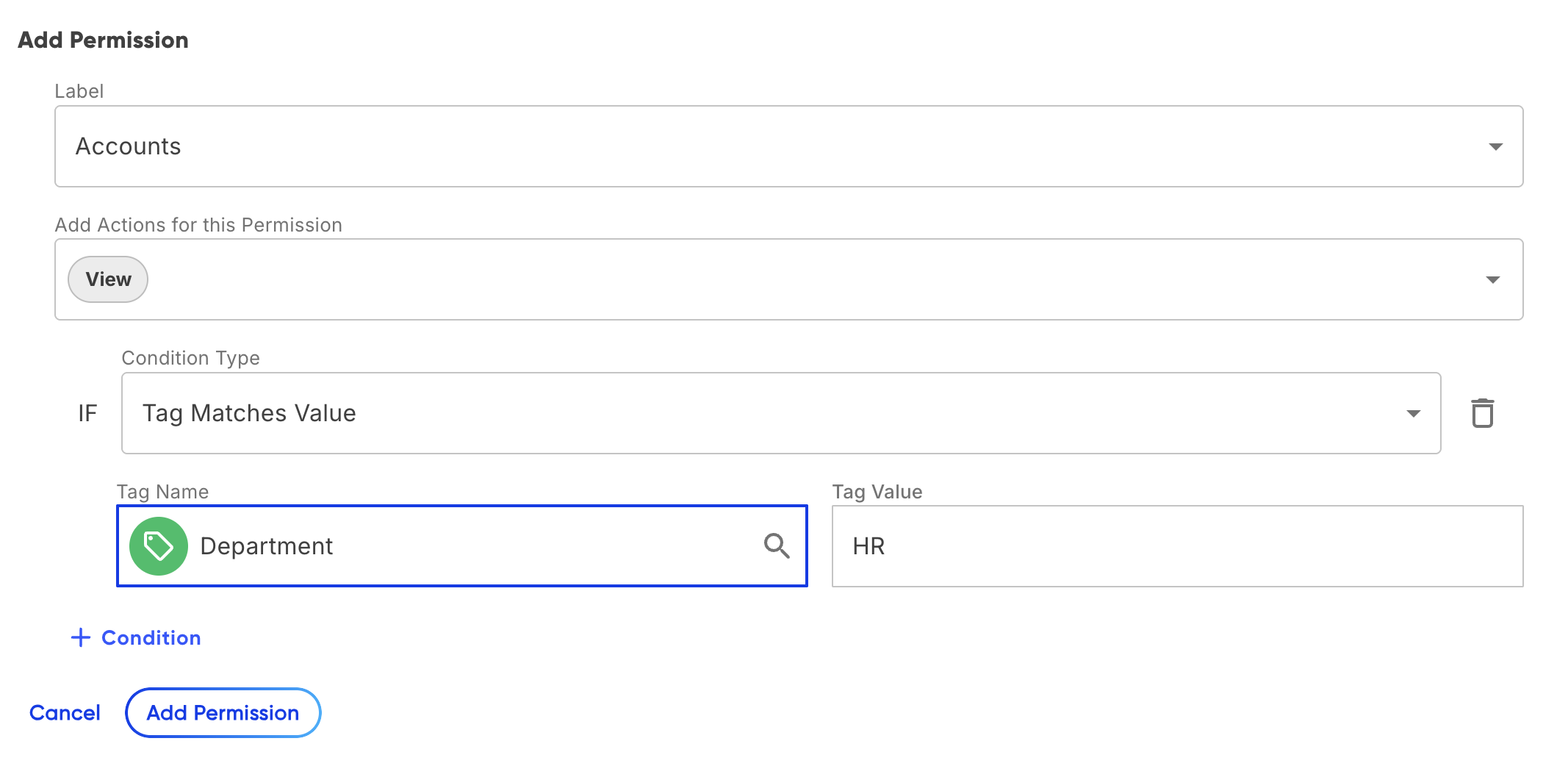
Find the permission you want to restrict (for example, Accounts → View).
Click Add Condition next to the permission.
Select the condition type and configure the criteria.
Click Save.
Conditions narrow access - they never expand it. A condition on the Accounts View permission means the user can only see Accounts that match the condition, not all Accounts plus the ones that match.
Condition types
The available conditions depend on the permission category. The tables below list condition types and where they apply.
Tag-based conditions like "tag equals" and "tag matches account tag" require selecting from existing tags rather than free-typing. This helps users ensure their tags match correctly. *
Tag Values are still case-sensitive. They must match exactly, like "HR" instead of "Human Resources."
Accounts conditions
Adding Conditions to Account Permissions allows you to limit access to certain accounts based on Tag Values.
| Condition | Effect |
|---|---|
| Tag Matches Value | Grant permissions to accounts with the Tag Name and Tag Value. |
| Tag Does Not Match Value | Exclude permissions to accounts with the Tag Name and Tag Value. |
Account conditions will apply to all areas where accounts are referenced, such as the Assign To action in submissions.
Forms conditions
Adding Conditions to Form Permissions allows you to specify which forms a user role can access.
| Condition | Effect |
|---|---|
| Created By This Person | Grant permissions only to the forms this person built, so form-building access is scoped to their own forms. |
| Form Is One Of | Grant permissions to specific forms. |
| Form Is Not One Of | Exclude permissions to specific forms. Unlisted forms will still be accessible based on other permissions. |
| Tag Matches Value | Grant permissions to specific forms based on Tag Names and Tag Values. |
| Tag Does Not Match Value | Exclude permissions to specific forms based on Tag Names and Tag Values. |
Form Conditions apply to the Forms page only, not to submission actions.
Submissions conditions
Submissions Conditions enable more detailed access control for user roles. Default permissions allow users to see their submissions and assignments. Consider adding alternative permissions if these are removed.
| Condition | Effect |
|---|---|
| Currently Assigned to This Person | Grant permissions to submissions currently assigned to this person. |
| Form Is One Of | Grant permissions to submissions from specific forms. |
| Form Is Not One Of | Exclude permissions to submissions from specific forms. |
| Previously Assigned to This Person | Grant permissions to submissions previously assigned to this person. |
| Submitted By This Person | Grant permissions to submissions submitted by this person. |
| Tag Matches Value | Grant permissions to submissions based on Tag Names and Tag Values. |
| Tag Does Not Match Value | Exclude permissions to submissions based on Tag Names and Tag Values. |
| Tag In Range | Control submissions permissions based on a range, such as budget thresholds or quantity limits. For example, set a range to allow access to reimbursement submissions over $10,000. |
Your Implementation Consultant will help set up these tags in forms. Contact Droplet Support if you're interested in setting this condition.
Packets conditions
Packet conditions limit access to specific packet templates, controlling what packet submissions users can view or manage.
| Condition | Effect |
|---|---|
| Packet Is One Of | Grant permissions to the selected packets. |
| Packet Is Not One Of | Exclude permissions to the selected packets. |
| Tag Matches Value | Grant permissions based on Packet tags. Tag Values need to match exactly. |
| Tag Matches Account Tag | Grant permissions based on Account tags. Tag Values need to match exactly. |
Packet conditions include all submissions within selected packets.
Dataset conditions
Dataset Permissions control access to the datasets behind forms. Grant permissions selectively to safeguard data integrity and workflow accuracy.
| Condition | Effect |
|---|---|
| Dataset Is One Of | Grant permissions to specific datasets. |
| Dataset Is Not One Of | Exclude permissions to specific datasets. |
| Tag Matches Value | Grant permissions based on dataset tags. Tag Values need to match exactly. |
Tip Combine multiple conditions on the same permission by adding more than one. Conditions are evaluated using OR logic - the user can access items that match any of the conditions.